
How to Install MariaDB on AlmaLinux 9 (In 5 Easy Steps)

 Study duration :
7 Minutes
Study duration :
7 Minutes
 0 Comment
If you are working with AlmaLinux and need a fast and stable database, MariaDB is exactly what you are looking for, whether you are working on a freshly set-up server or a serious environment, MariaDB is always a safe choice, especially when you know that installing and setting it up on AlmaLinux only takes a few minutes. In this guide, we will walk you through the installation of MariaDB on AlmaLinux 9 step by step and in a completely practical way, exactly from the perspective of someone who is working with a real terminal, everything is explained simply and practically so that even if it is your first time installing a database, you can proceed with confidence, so if you want a powerful and reliable database, just enter a few simple commands, let’s get started you can check out our website for more.
Prerequisites
Before starting the installation, it is best to have the following:z
- AlmaLinux 9 is installed and running on your system
- Sudo or root user access
- A few minutes of time and a ready mind to work with the terminal
So let’s get down to business.
5 Easy steps to install MariaDB on AlmaLinux 9
Step 1: Update the system repositories
The first step should always be to update the system. This will ensure that the packages and dependencies are up to date, and you don’t encounter any strange errors when installing MariaDB.
sudo dnf update -y
The -y flag means that all questions will be automatically answered with YES. After running, your fresh system is ready to install MariaDB.
Step 2: Install MariaDB
Luckily, AlmaLinux 9 has the MariaDB package in the official repositories by default. Just enter the following command:
sudo dnf install mariadb-server -y
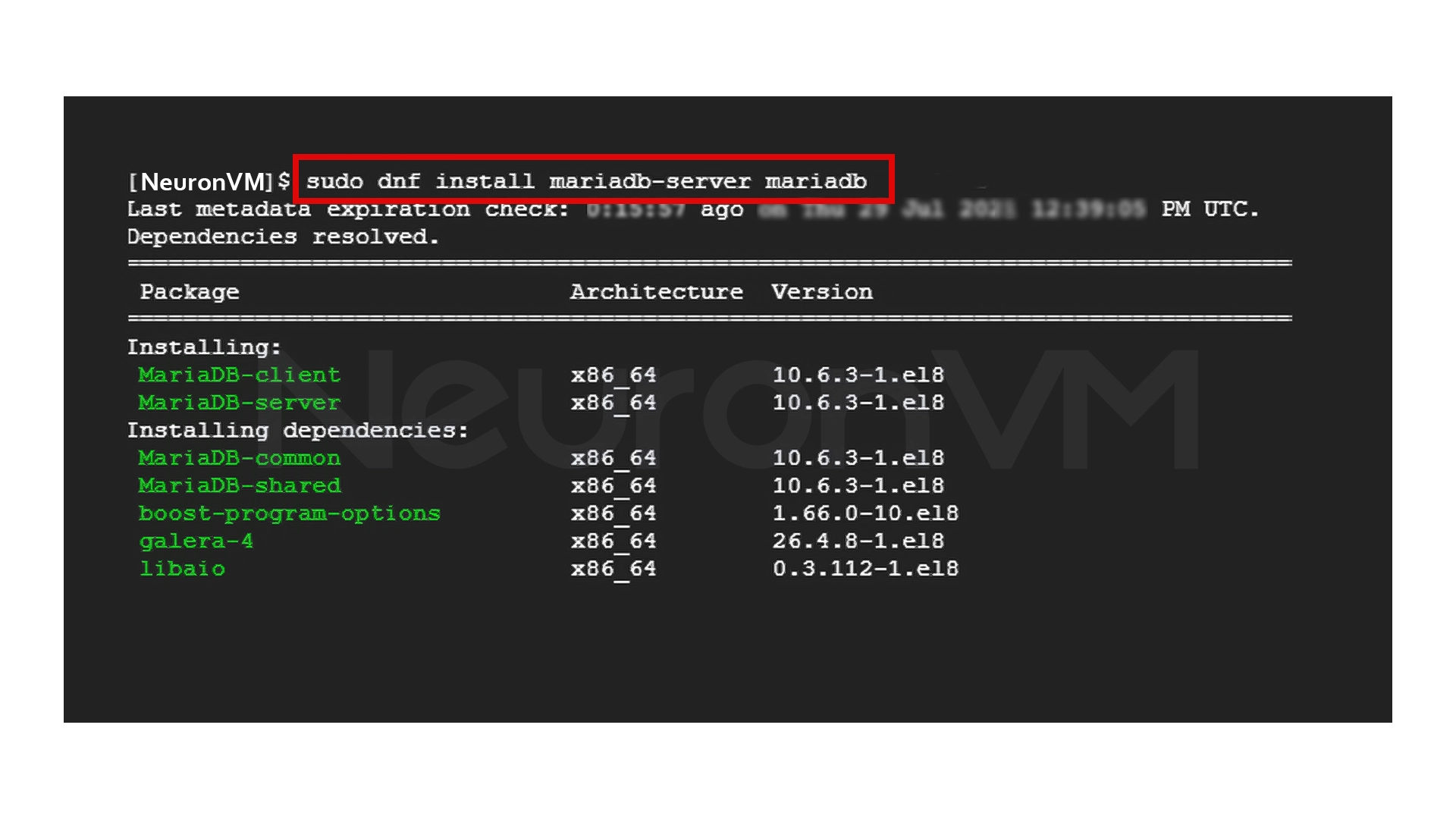
This will install MariaDB along with all the necessary dependencies.
Step 3: Enable and Run MariaDB
It’s time to run the service. First, start the service:
sudo systemctl start mariadb
To have MariaDB start automatically after reboot, enable it:
sudo systemctl enable mariadb
Step 4: Secure MariaDB
MariaDB comes with a ready-made script for securing it. By running it, you can:
- – Set the root password
- – Remove anonymous users
- – Prevent remote root logins
- – Delete the test databases
Run the following command:
sudo mysql_secure_installation
You will be asked a few questions; Answer as needed. This step will double the security of your database.
Step 5: Testing MariaDB
Check if MariaDB is installed and running properly by using the following command:
mysql -u root -p
Enter the password you set in the previous step, then if you are logged into the MariaDB environment, you have a healthy and ready database.
My Experience with Installing MariaDB on AlmaLinux
The first time I installed MariaDB on AlmaLinux, I thought I was going to encounter dozens of errors and problems, but the truth is that the installation was one of the smoothest I’ve ever had on Linux, one thing that helped a lot was running the mysql_secure_installation script, without it, there’s always a security flaw, I also learned that properly setting performance values like the buffer pool is not an “optional” thing at all, it really has a serious impact on the speed and stability of the database, If you have a busy project, I recommend taking the time to adjust the config file to your needs.
Conclusion
Setting up MariaDB on AlmaLinux 9 is not as complicated or tedious as many people think, with a few simple commands, you can install the database, enable the service, and create a secure and reliable environment by running a security script. If you have more advanced needs, the MariaDB configuration file is completely open to customization Ultimately, if you follow these basic steps correctly, you will have a powerful, lightweight, and stable database that can be used for everything from small projects to large systems. In my personal experience, MariaDB on AlmaLinux is very compatible, fast, especially if you spend a few minutes after installation to configure security and performance.



No, you have to install it manually from the official system repositories.
Yes, the service needs to be started once and then configured to start automatically after each server startup.
Absolutely necessary. This step sets a strong password, removes unnecessary permissions, and increases database security.